
SMS campaign management is how you run text campaigns as repeatable, trackable operations instead of one-off sends. You pick an audience, write the message, schedule it, choose whether it goes out all at once or drips over time, and watch progress as it sends. In PitchPrfct, that all lives in one Campaigns screen — and compliance runs underneath every send.
This is PitchPrfct's blog, and we make SMS software, so weigh that. But what follows is the practical version: how to plan, send, and manage SMS campaigns that actually move numbers.
What is SMS campaign management?
SMS campaign management is the practice of planning, sending, and tracking text campaigns as named, repeatable units — each with its own audience, message, schedule, and status. A single text blast is one send. Campaign management is the layer above it: you run many sends, see how each is doing, pause one that's misfiring, resume it later, and reuse what worked.
In practice it answers four questions for every campaign:
- Who gets it — the audience or contact list.
- What they get — the message, personalized with merge fields.
- When it sends — a scheduled time, inside quiet hours.
- How it sends — all at once (one-time) or spread out (a drip).
Texting a list is one thing. Managing a program is another. A retailer running a Friday promo, a recruiter nurturing candidates over two weeks, and a nonprofit sending a donation push all use the same four levers — they just set them differently.
Every campaign in one view
Open Campaigns and you see the whole program at a glance: each campaign by name, its type, when it was created and completed, its status, and a live progress bar.
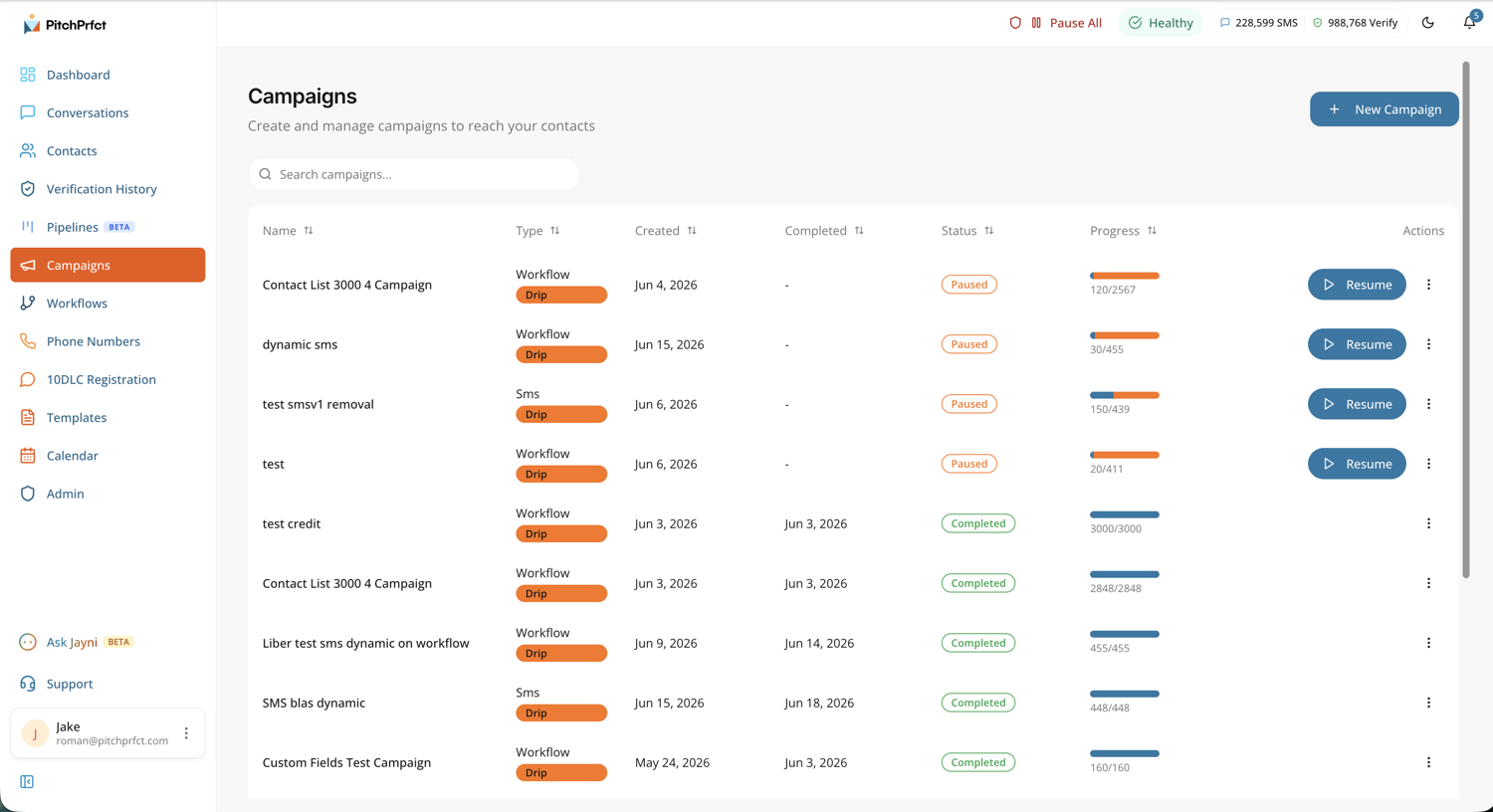
The columns do the work:
- Type — whether it's a one-time SMS send or a drip, tagged so you can tell them apart at a scan.
- Status — running, paused, or completed.
- Progress — how many of the audience have been sent to so far (e.g. 448 of 3,000), updating as it goes.
- Actions — pause a live campaign, resume a paused one, or open it.
This is the part most teams miss when they manage SMS campaigns out of a spreadsheet and a personal phone: there's no record of what went out, no way to pause mid-send, and no shared view. A campaign list fixes that.
Drip vs. one-time campaigns
The biggest decision in any SMS campaign is whether it sends once or unfolds over time. Both have a job.
| One-time campaign | Drip campaign | |
|---|---|---|
| What it does | Sends one message to the audience in a single window | Sends a sequence, spaced over hours or days |
| Best for | Sales, launches, event reminders, alerts | Onboarding, nurturing, multi-touch follow-up |
| Cadence | One send | Multiple messages on a schedule |
| Reads like | A broadcast | A conversation that paces itself |
Pick one-time when timing and reach matter most: a flash sale, a closure notice, a day-of event reminder. Everyone gets the same message in the same window.
Pick a drip when the goal takes more than one touch. A new-customer welcome series, a candidate nurture over two weeks, a renewal sequence that nudges at 30, 14, and 3 days out. The drip paces itself so you're not hand-sending each step.
This matters more than it sounds, because targeting and sequencing beat raw volume. Broad one-shot broadcasts convert in the 0.1%–0.6% range, while triggered, sequenced flows convert several times higher — abandoned-cart messages, for instance, land between 3.7% and 10.2% (Omnisend, 2026 benchmarks). A well-built drip to the right segment usually outperforms a bigger blast to everyone.
When a drip needs branching logic — wait for a reply, then send a different message, then route to a person — that's where a campaign graduates into a multi-step workflow. Campaigns and workflows share the same list in PitchPrfct, so you can start simple and add logic later.
How to build and manage an SMS campaign
The flow is the same for a single send or a two-week drip.
- Pick the audience. Choose a contact list or segment. A relevant campaign to 500 people beats a generic one to 5,000 — segment by location, stage, or interest when it helps.
- Write the message. One idea, one ask, near 160 characters. Identify yourself, lead with the value, and give one clear next step. (Emojis force Unicode and can split your text into more — and more expensive — segments.)
- Personalize with merge fields. A first name and a relevant detail lift response. Reuse proven SMS templates so you're not writing from scratch every time.
- Choose the type. One-time for a single send, drip for a paced sequence — and set the spacing if it's a drip.
- Schedule the send. Pick a time inside quiet hours, when your audience is likely to act. Quiet-hours enforcement keeps you compliant automatically.
- Send a test to yourself and a teammate. Check links, the opt-out line, and how it renders.
- Launch and track. Watch the progress bar fill. Pause if something's wrong, fix it, and resume.
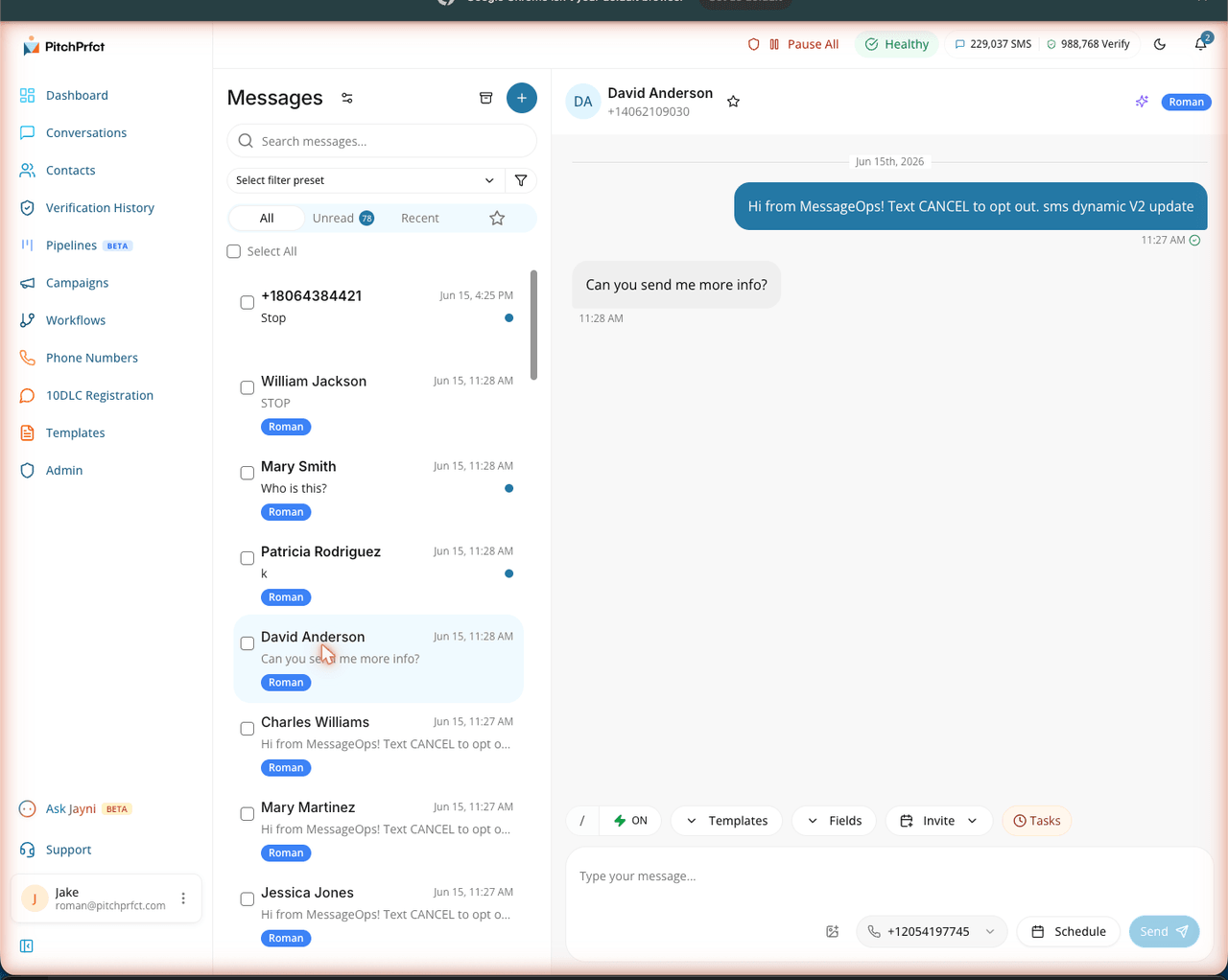
- Work the replies. A campaign isn't done when it sends — it's done when you've handled the responses. Replies route to a shared conversations inbox so a human can close.
Build a campaign by asking for it
If you'd rather describe the campaign than click through it, Jayni — PitchPrfct's AI assistant — can build one from a prompt. Tell it the audience, the offer, and the timing, and it drafts the message and sets up the campaign for you to review. It's live in-app, and it'll also help with 10DLC and compliance questions along the way.
Compliance, handled underneath
Every campaign you send runs on the same compliance layer, so you don't have to wire it up per send. PitchPrfct handles:
- Opt-out automatically — STOP is honored immediately and permanently, and that contact is scrubbed from future sends.
- Quiet hours — sends are held to compliant local-time windows.
- List scrubbing — invalid and opted-out numbers are filtered before the send.
- Guided 10DLC — registration is walked through so your campaigns actually deliver instead of getting filtered.
This is why managed campaigns beat a spreadsheet: the rules that protect your number are part of the send, not a checklist you hope you remembered. For the full picture on the channel, start with what SMS marketing is.
Pricing that doesn't punish a big campaign
Most SMS tools charge per message and then stack carrier surcharges on top, so a large campaign triggers a surprise bill. PitchPrfct is flat:
- $99/mo + $0.007 per segment, all-in — carrier fees included, charged per message only.
- $1/mo per number, and the standard $10/mo TCR campaign fee (the same fee every provider passes through) applies on top.
- Credits roll over one month, so a slow week isn't wasted.
No credit buckets, no per-message carrier add-on. A 3,000-contact campaign costs what the math says it costs. See full pricing.
Frequently asked questions
What is SMS campaign management?
What's the difference between an SMS campaign and an SMS blast?
What is a drip SMS campaign?
Can I pause and resume an SMS campaign mid-send?
How much do SMS marketing campaigns cost?
Can AI build my SMS campaign?
Ready to run campaigns you can schedule, track, and reuse? Start a free trial.