A booked slot is worth nothing if the person doesn't show. SMS appointment scheduling fixes that: book the appointment, then text a reminder where people actually read it. PitchPrfct does both in one place — an in-app calendar, native sync with Google Calendar and Calendly, and the texting engine that sends the reminders. This is for anyone who books time with clients: agents, recruiters, shops, advisors.
Why text reminders beat the no-show
People don't skip appointments to be rude. They forget. A text lands where an email gets buried and a voicemail goes unheard — it's the channel people open in seconds. That's the whole case for text appointment reminders: a short message at the right time, on the device in their pocket.
The numbers back it up. Automated appointment reminders cut no-show rates by an average of 38% to 50%, according to SchedulingKit's 2026 reminder statistics. The pattern that works: a confirmation when the slot is booked, a reminder the day before, and a quick nudge the morning of. Each one is a chance to catch a no-show early — or let someone reschedule instead of ghosting.
The in-app calendar
Scheduling and messaging usually live in two different tools. PitchPrfct puts the calendar inside the platform, next to the conversations it drives. You get a month view, an Add Event button, and filters. Click a day, add an appointment, and it's on the board.
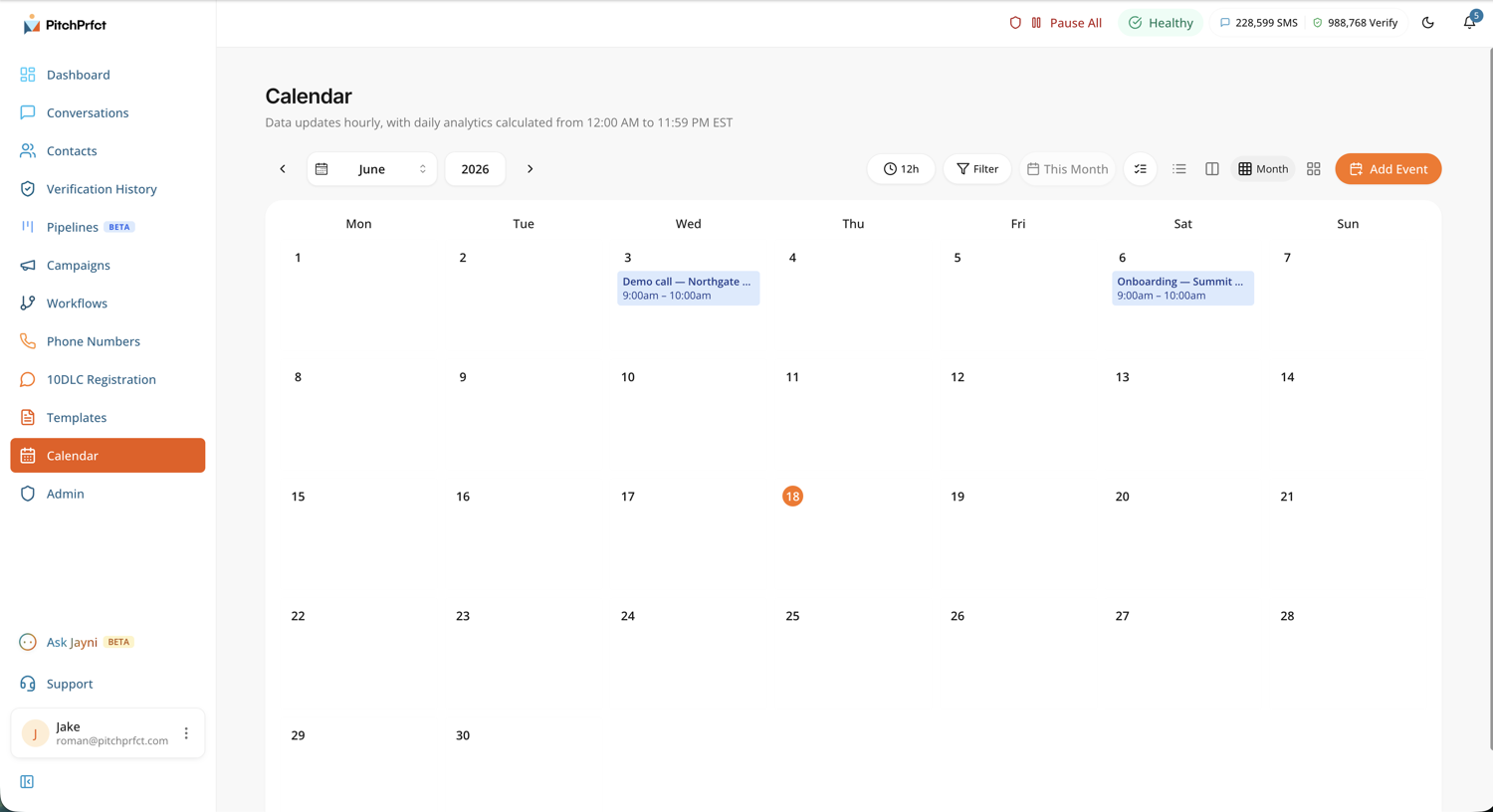
Keeping the calendar in-app shortens the distance between a booked slot and a sent reminder. When the schedule and the texting engine share a home, there's no export, no copy-paste between tabs, no second login. You book the appointment and the reminder is one step away.
Sync Google Calendar and Calendly
You already book appointments somewhere. PitchPrfct connects to the two tools most operators use — Google Calendar and Calendly — both as native integrations. Connect your account and the appointments you set show up in PitchPrfct without manual entry.
That matters for appointment reminder software in general: the reminder is only as good as the data behind it. Re-typing every booking by hand is where errors and missed texts come from. Sync removes that step. A recruiter books a screen in Calendly, a real estate agent drops a showing on Google Calendar — either way, it's available to message against in PitchPrfct.
Appointment reminder templates (copy and paste)
A good appointment reminder template is short, names the person, names the time, and makes the next step obvious. Use merge fields so every text is personal at scale. Here are three to start from:
Confirmation (on booking):
Hi {{name}}, you're booked for {{time}}. Reply C to confirm or R to reschedule. — [Your Business]
Day-before reminder:
Hi {{name}}, reminder: we've got you at {{time}} tomorrow. See you then! Reply STOP to opt out.
Morning-of nudge:
Morning {{name}}! Just a heads up — your appointment is today at {{time}}. Reply if anything changed.
Save these in PitchPrfct with the / template picker, and {{name}} /
{{time}} fill from each contact. For a wider library and the rules that keep
copy compliant, see our SMS templates.
Appointment reminder templates by industry
The same structure adapts to whatever you book. A few appointment reminder text message samples to copy:
Dental appointment reminder:
Hi {{name}}, this is [Practice] — you're due for your cleaning with Dr. [Name] on {{time}}. Reply C to confirm or R to reschedule.
Medical appointment reminder:
Hi {{name}}, reminder of your appointment at [Clinic] on {{time}}. Please arrive 10 min early. Reply R to reschedule or STOP to opt out.
Salon / spa:
Hi {{name}}! See you {{time}} for your appointment with [Stylist]. Reply C to confirm — and text us if you'd like to add a service.
Auto service:
Hi {{name}}, your vehicle service at [Dealer] is set for {{time}}. Reply C to confirm or call us to move it. A loaner is available on request.
A note for healthcare: a reminder text can name the time and practice, but keep protected health details out of the message — that's the simple version of staying HIPAA-friendly. Lead with consent and the basics; the TCPA and opt-in guides cover the rest (this isn't legal advice).
Because it's all SMS, the compliance guardrails apply on their own. Opt-out (STOP) handling, quiet hours, and list scrubbing run on reminder texts the same way they run on everything else — so a "morning of" reminder never fires before quiet hours lift. The reminders ride the same SMS marketing engine you'd use for any campaign.
Automate the timing with workflows
Reminders shouldn't depend on you remembering to send them. PitchPrfct's workflows automate the timing so the text fires on its own. Tie a reminder to a booked appointment and the message goes out when it should, without you watching the clock.
That's the pattern that scales: automate the timing, keep a human on the judgment. The reminders run in the background while you spend your attention on the conversations that need it. To wire scheduling into the rest of your stack — your CRM, your booking forms, your other apps — PitchPrfct offers integrations & API through Zapier, Make.com, a REST API, and webhooks.
AI appointment setting with Jayni
Booking the appointment is often the harder half. Jayni, PitchPrfct's AI assistant, can handle AI appointment setting — running the back-and-forth that turns an interested reply into a booked slot. It qualifies the response, proposes times, and moves the lead toward the calendar.
That covers the slow part of working a list: the dozen messages it takes to pin down a time. Jayni handles the chase; you keep the relationship and approve what goes out. Jayni is live in the platform today.
PitchPrfct is one flat price: $99/mo plus $0.007 per segment, carrier fees included, with $1/mo per number and the standard $10/mo TCR campaign fee on top. See the full pricing breakdown.
Frequently asked questions
What is SMS appointment scheduling?
Does PitchPrfct have its own calendar?
How much do text appointment reminders cut no-shows?
Can I automate appointment reminder texts?
Can AI book appointments for me?
Do reminder texts follow TCPA rules?
Ready to cut no-shows with text appointment reminders? Start a free trial.