
Most leads don't reply to the first text. They reply to the third. SMS workflow automation is how you send that second and third message on time, every time, without anyone remembering to do it. PitchPrfct Workflows is a drag-and-drop builder for exactly that: chain a trigger, a send, a wait, a branch, and a follow-up into a sequence that runs on its own.
This is for any team that texts at volume and loses deals to slow or forgotten follow-up — sales, real estate, agencies, recruiters, e-commerce, service businesses. You build the sequence once. It runs for every contact.
What is SMS workflow automation?
SMS workflow automation is software that sends text messages based on rules and timing instead of manual sends. You define what starts a sequence, what goes out, how long to wait between messages, and which path a contact takes based on what they do. The system handles the rest — for one contact or ten thousand.
The core building blocks are simple:
- Trigger — the event that starts the sequence: a new lead enters, a form is filled, a date arrives, or a webhook fires from another app.
- Send — the text that goes out, personalized per contact with merge fields.
- Wait — a delay before the next step: an hour, a day, three days.
- Branch — a split in the path based on a condition, so repliers and non-repliers go down different tracks.
- Follow up — the next send, which fires automatically when the wait ends.
String those together and you get a sequence that texts a new lead within seconds, waits a day, follows up, branches the silent ones into a nudge, and routes anyone who answers straight to a person — all without manual effort. That's the gap between a list that goes cold and a pipeline that keeps moving.
Automated follow-up is where the money is. Drip flows convert at a 3.81% click-to-conversion rate versus 0.97% for manual broadcasts, per Vero's Ultimate Guide to SMS Marketing in 2026 — nearly four times the result for messages you set up once and never touch again.
For the bigger picture on the channel itself, start with our guide to SMS marketing.
How the Workflows builder works
Workflows is a visual canvas. You drag steps onto it and connect them in order — no code, no scripting. Each step is one of the building blocks above, and you arrange them to match how your follow-up actually goes.
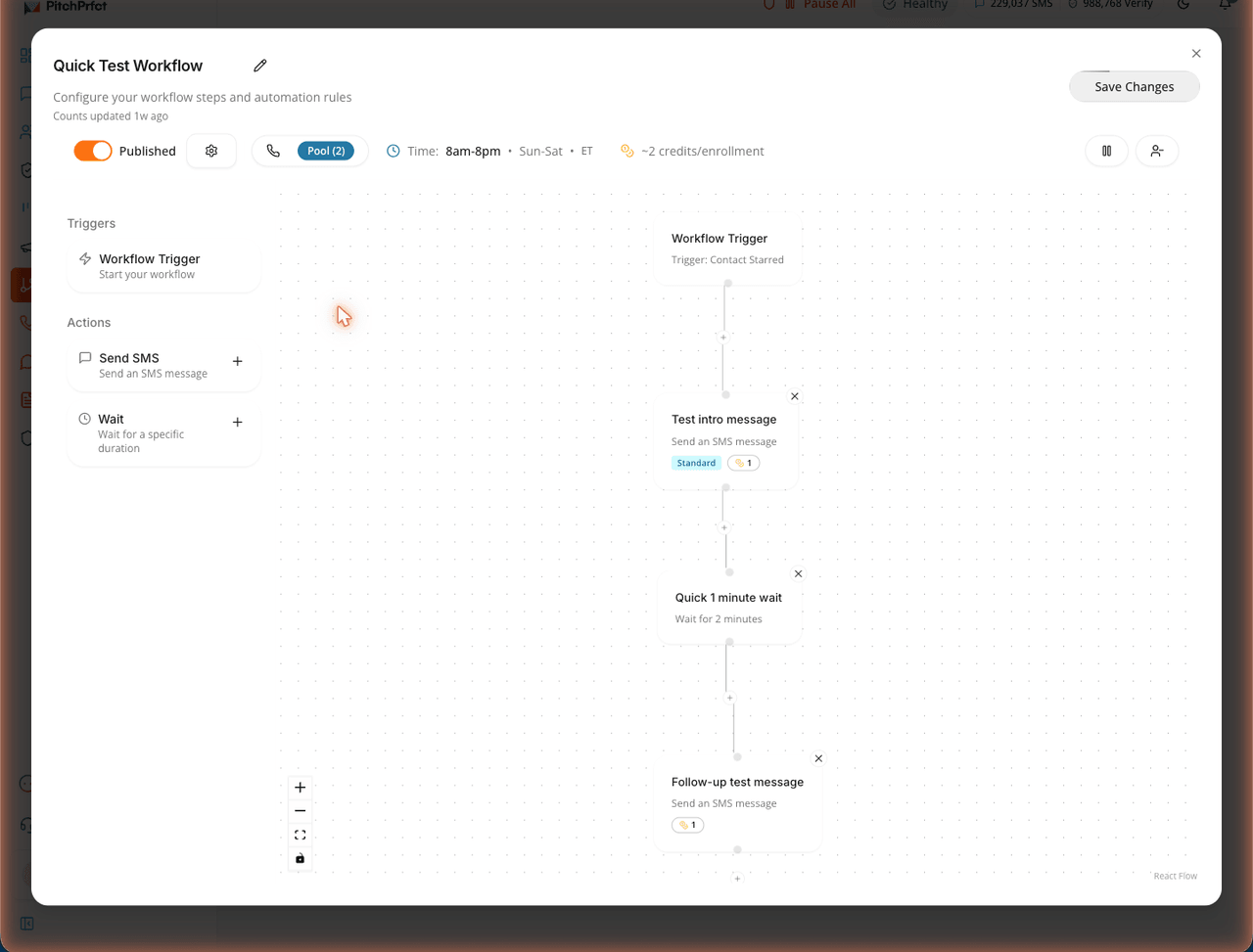
A typical build looks like this:
- Set the trigger. Start the sequence on an event — a new lead entering, a webhook from your CRM — or on a time delay.
- Add a send. Write the first text. Personalize it with merge fields.
- Add a wait. Choose how long to pause before the next message.
- Add a follow-up send. Write the next text. It fires automatically when the wait ends.
- Branch where it matters. Split the path so people who reply and people who stay silent get different next steps.
- Repeat as needed. Stack more wait-then-send steps until the sequence covers your full cadence.
Build it once and it applies to every contact that hits the trigger. Each person moves through the steps on their own timeline, so a lead who enters today and one who enters next week both get the same disciplined follow-up.
Common use cases
The same trigger, send, wait, branch, and follow-up pattern covers most of what teams need a sequence for.
Speed-to-lead
A new lead comes in. Within seconds, the first text goes out — while they still remember filling out the form. Wait an hour, send again. Wait a day, send once more. Fast first contact is the single biggest lever on conversion, and automation is the only way to hit it every time.
Reminders
Appointment tomorrow? Payment due? Event this weekend? A time-based sequence sends the reminder on schedule and a nudge if needed. Fewer no-shows, less chasing.
Nurture
Not every lead is ready now. A nurture sequence spaces out value over days or weeks — one useful text at a time — so you stay top of mind without manual sends. When they're ready, they reply.
Win-back
A list has gone quiet. A short re-engagement sequence — a check-in, a wait, an offer — pulls some of those contacts back into a conversation. The ones who answer go straight to a human.
If you sell property, the follow-up cadences in our guide to real estate text message marketing map directly onto these workflows. And every send in a sequence can start from a proven pattern — pull copy from our library of SMS templates and drop it into a step.
Manage every automation in one place
Once you've built a sequence, it lives in your Workflows list alongside the rest. Publish the ones that are live, pause the ones you're testing, and see the whole set at a glance.
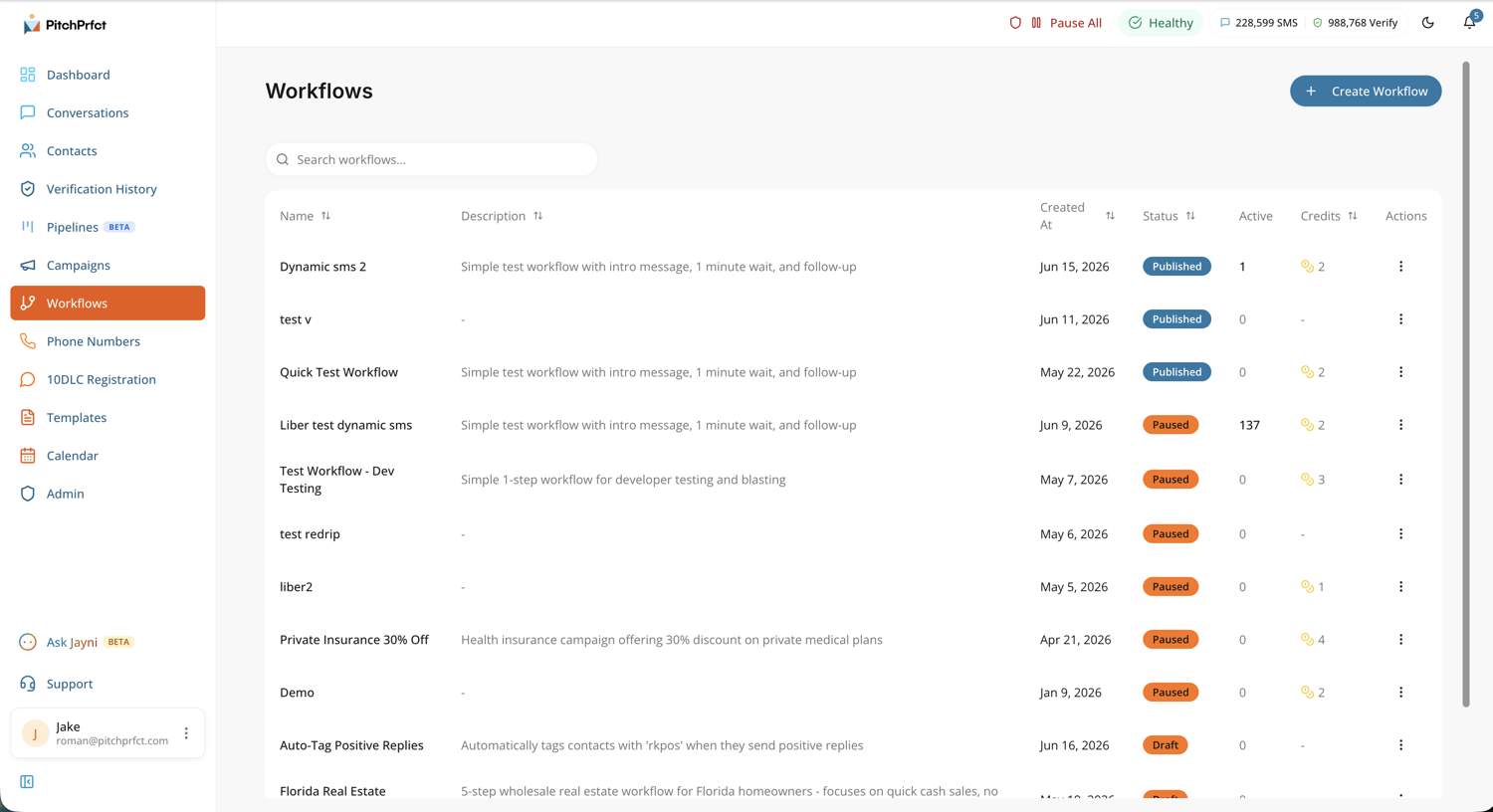
Pausing a workflow stops new contacts from entering without deleting the build, so you can iterate on copy or timing and switch it back on. Most teams run several at once: a speed-to-lead sequence, a nurture track, a reminder flow, a win-back.
Automate the timing, keep the replies human
This is the part that matters. Automation handles the sending and the timing. It does not pretend to be a person.
Workflows pairs with the conversations inbox. The moment a contact replies to any message in a sequence, that reply lands in a shared inbox where a real person picks it up. The automation got the conversation started on time — your team takes it from interest to close. It matters more than it sounds: 42% of total replies come from follow-up messages rather than the first text, according to Salesmessage's SMS Marketing Statistics 2026 — so the sequence that keeps going is the one that gets the answer.
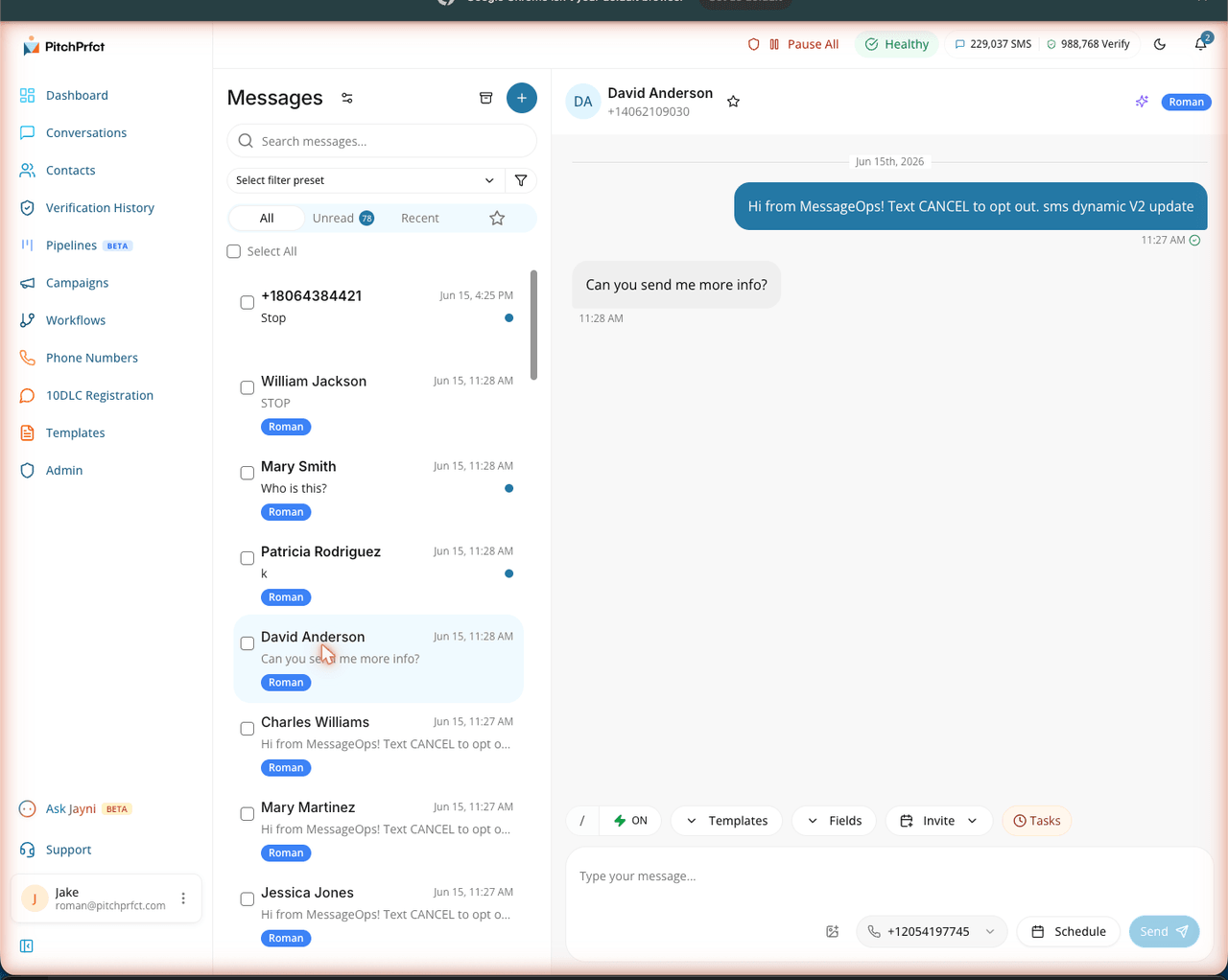
That split is the whole point of doing SMS automation well: machines are great at "send the third text on day four," and terrible at handling a real objection. Workflows keeps each on the right side of the line.
It also keeps you compliant at every step. STOP and opt-out handling, quiet-hours enforcement, and list scrubbing apply automatically across the whole sequence — so a multi-step workflow can't accidentally text someone who opted out or message outside allowed hours. Guided 10DLC registration gets your number provisioned to send in the first place.
Want a human-quality first response without staffing it? Our Jayni AI assistant is live and can field the initial reply, then hand off to your team. Jayni can also build a workflow from a plain prompt — describe the sequence you want and it lays out the steps for you.
How Workflows fits with the rest of PitchPrfct
Workflows is the automation layer. It sits alongside two other ways to send:
- Campaigns — one message to a whole list at once, for announcements, sales, and time-sensitive blasts.
- Workflows — multi-step sequences that run per contact over time, for follow-up and nurture.
Most teams use both: a campaign to open, a workflow to follow up with everyone who didn't reply. And because pricing is per-message only — $99/mo + $0.007 per segment, all-in with carrier fees included — a five-step sequence doesn't trigger a surprise bill. You pay for the texts that actually send. (As with any provider, $1/mo per number and the standard $10/mo TCR campaign fee apply on top.) See full pricing.
For builders, Workflows also connects outward: Zapier, Make.com, a REST API, and webhooks let you trigger a sequence from your CRM, your store, or any app — and push events back out when a step runs.
Frequently asked questions
What is SMS workflow automation?
How do I set up an automated SMS follow-up?
Will automated texts feel robotic to the people who get them?
Is automated SMS follow-up compliant?
What's the difference between a campaign and a workflow?
Ready to put your follow-up on autopilot — and keep the replies human? Start a free trial.