
A good text template saves you from staring at a blank message box, and it's
already been shaped to get a reply. Below is a free library you
can copy, paste, and personalize, organized by job: reminders, sales follow-up,
promotions, reviews, and more. {{curly braces}} are merge fields your platform
fills in automatically.
This is PitchPrfct's blog, so we make SMS software. But these templates work on any platform — what matters is that you adapt them to your voice and follow the few rules below so they actually land.
The numbers back this up. SMS hits a ~98% open rate against email's single digits, and 90% of recipients open a text within three minutes (Revenue Memo's 2026 SMS statistics). That speed is why a good template that lands at the right moment outperforms almost any other channel.
The 5 rules that make any template work
Before the library, the fundamentals that separate a replied-to text from an opt-out:
- Identify yourself in the first message. People delete texts from unknown numbers. Lead with your name and business.
- Keep it short. Aim for ~160 characters (one segment). One idea, one ask.
- Personalize. First-name personalization alone improves SMS conversion by 19%, and personalized messages see a 35% higher engagement rate than generic blasts (Revenue Memo). That's exactly what merge fields are for.
- One clear call to action. Book, reply, tap one link. Never two asks.
- Stay compliant. Only text opted-in contacts, include an opt-out where required, and respect quiet hours. (New to the rules? See TCPA and 10DLC.)
Compliance is not optional. A great template sent to a non-consenting contact is still a violation. Text only opted-in people, register your 10DLC campaign so messages deliver, honor STOP instantly, and respect quiet hours. PitchPrfct handles opt-out, quiet hours, and list scrubbing automatically — but the rules apply on every platform.
Appointment & booking reminders
Reminders are the highest-ROI texts most businesses send — they directly cut no-shows.
- Confirmation: "Hi {{name}}, you're booked with {{business}} on {{date}} at {{time}}. Reply C to confirm or R to reschedule."
- 24-hour reminder: "Reminder: your appointment with {{business}} is tomorrow at {{time}}. See you then! Reply R to reschedule."
- Same-day reminder: "Hi {{name}}, just a heads-up your appointment is today at {{time}}. Reply if anything's changed."
- No-show follow-up: "Sorry we missed you today, {{name}}. Want to grab a new time? Reply and I'll get you booked."
- Waitlist opening: "Good news {{name}} — a {{day}} slot just opened at {{time}}. Want it? Reply YES and it's yours."
Sales follow-up & lead nurture
- Speed-to-lead (new inquiry): "Hi {{name}}, it's {{rep}} at {{business}}. Thanks for reaching out about {{topic}} — got a quick minute to chat?"
- After a quote: "Hi {{name}}, following up on the quote I sent. Any questions I can answer? Happy to walk you through it."
- Gentle nudge: "Hey {{name}}, still thinking it over? No pressure — just let me know if {{offer}} still works for you."
- Re-engagement (gone quiet): "Hi {{name}}, it's been a bit! Still interested in {{topic}}? I can pick up right where we left off."
- Closing the loop: "Hi {{name}}, I'll close out your file if the timing isn't right — just reply KEEP if you'd like me to stay in touch."
Promotions & offers
- Flash sale: "{{name}}, today only: {{offer}} at {{business}}. Tap to shop {{link}}. Reply STOP to opt out."
- New arrival/drop: "Just in at {{business}}: {{product}}. Early access for you — {{link}}."
- Coupon code: "Treat yourself, {{name}} 🎁 Use {{code}} for {{discount}} off through {{date}}: {{link}}."
- Cart/abandon nudge: "Still want {{product}}, {{name}}? It's waiting for you — finish up here: {{link}}."
- Loyalty/VIP: "Because you're a regular, {{name}}: {{perk}} just for you. Show this text at checkout."
Reviews & referrals
- Review request: "Hi {{name}}, thanks for choosing {{business}}! If you have 20 seconds, a quick review really helps: {{link}}"
- Post-purchase check-in: "Hi {{name}}, how's everything with {{product}}? Reply here if you need anything — we're glad you're with us."
- Referral ask: "Glad you're happy, {{name}}! Know anyone who'd love {{business}}? Send them my way and there's {{reward}} in it for you."
Events & webinars
- Invite: "Hi {{name}}, you're invited to {{event}} on {{date}}. Save your spot: {{link}}."
- RSVP reminder: "{{name}}, {{event}} is almost here. Still planning to join? Reply Y or N."
- Day-of: "Today's the day! {{event}} starts at {{time}}. Here's your link: {{link}}. See you soon."
Customer service & operations
- Order confirmation: "Thanks {{name}}! Order #{{number}} is confirmed. We'll text you when it ships."
- Shipping update: "{{name}}, your order is on the way 📦 Track it here: {{link}}."
- Support follow-up: "Hi {{name}}, did we fully resolve your issue? Reply YES or tell us what's still off."
- Closure/alert: "Heads-up {{name}}: {{business}} will be closed {{date}} for {{reason}}. We'll be back {{return_date}}."
- Payment reminder: "Hi {{name}}, a friendly reminder your balance of {{amount}} is due {{date}}. Pay here: {{link}}."
How to use these well
Templates are a starting point, not a script to send verbatim to everyone:
- Make them sound like you. Match your real tone — stiff templates read as spam.
- Lean on merge fields so every send feels one-to-one.
- A/B test the ones you send most — small wording changes move reply rates.
- Automate the timing, keep the replies human. Trigger reminders and follow-up automatically, then have a person handle responses.
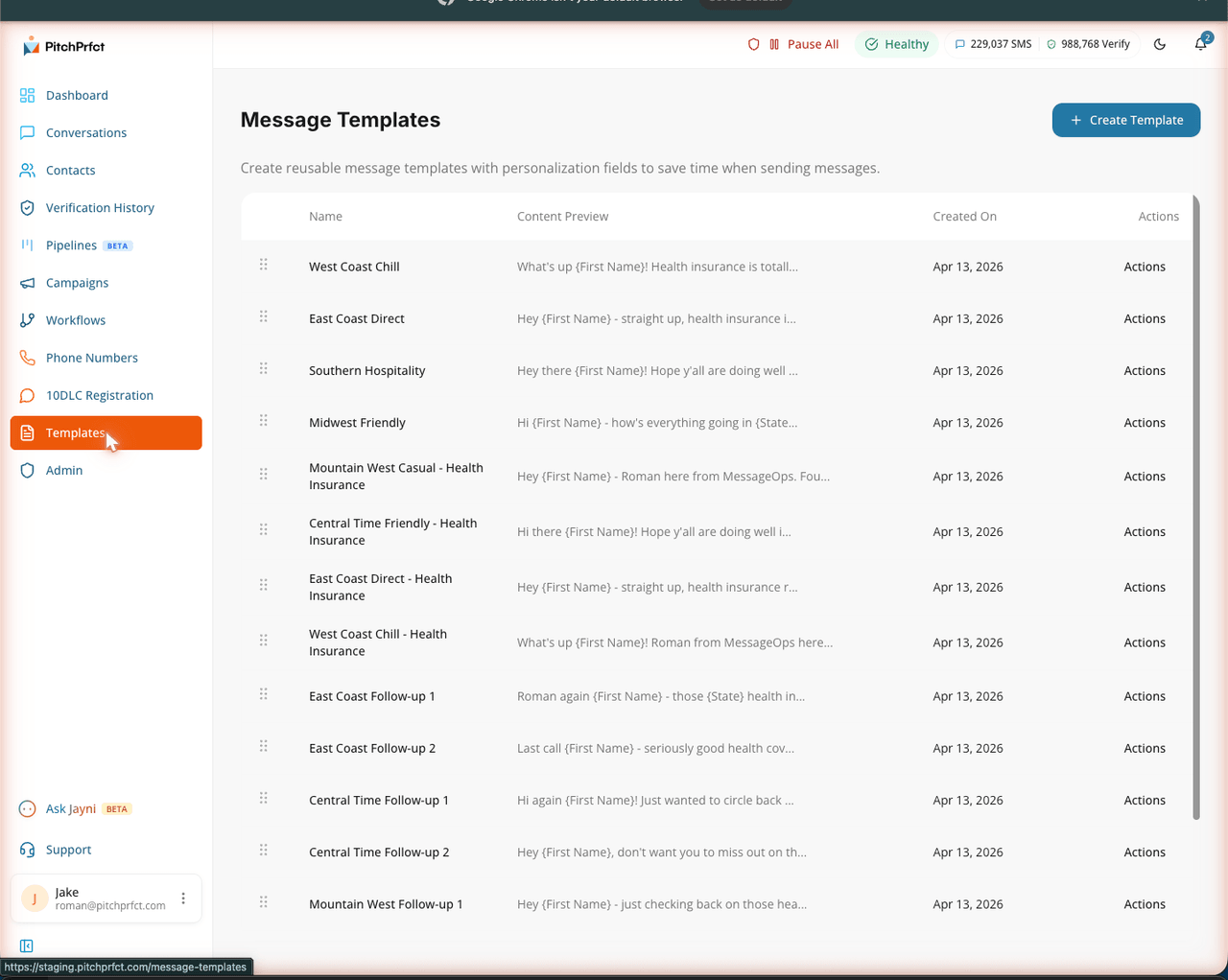
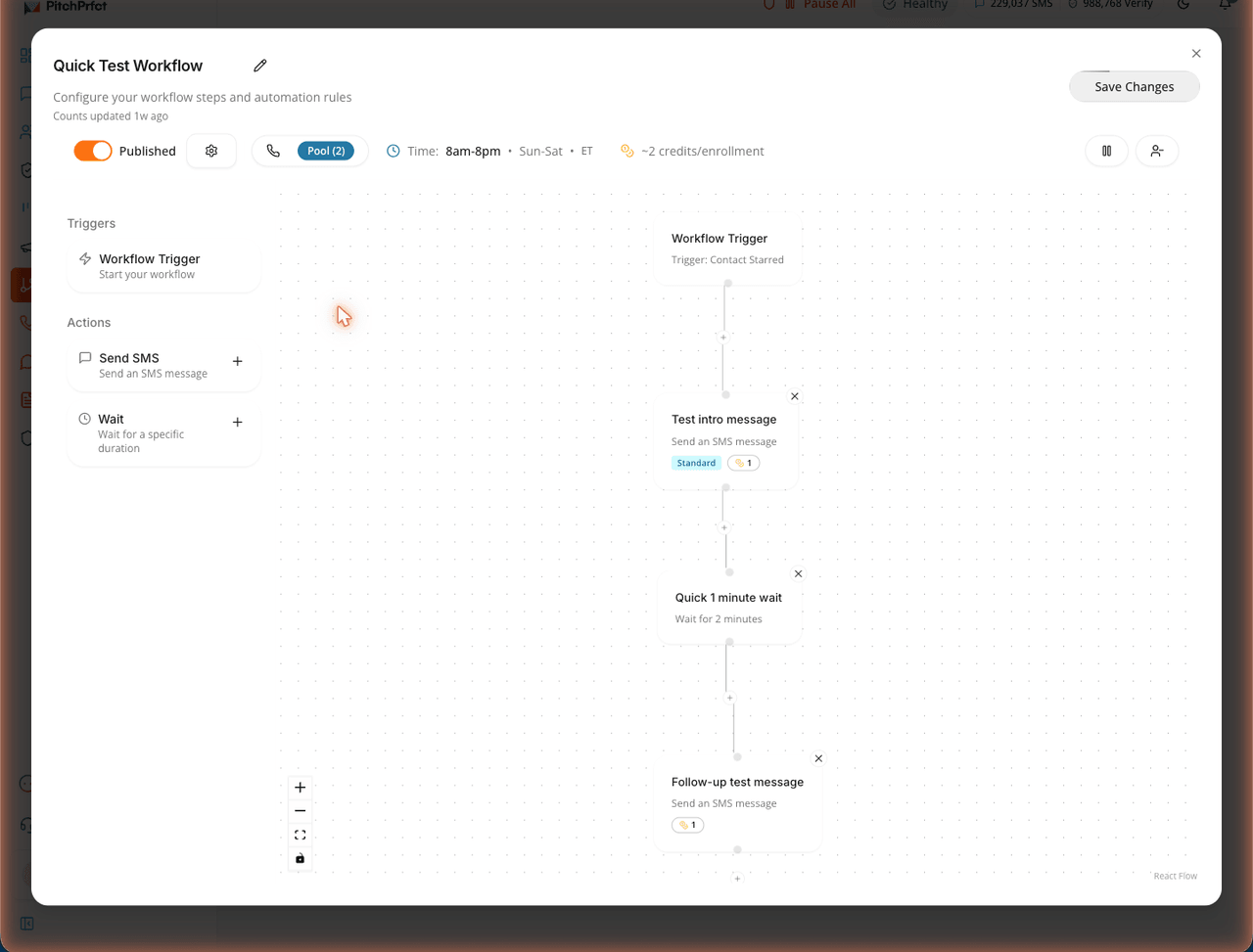
The automation part matters more than it looks. Behavior-triggered flows — a booking, a new lead, an abandoned cart — consistently outperform broad sends, and brands texting weekly see roughly 21% more revenue than monthly senders (Revenue Memo). Build the sequence once and the right template fires at the right time.
For the full playbook on the channel, start with what SMS marketing is, and if you're sending to a whole list at once, see how to send an SMS blast. Working a specific vertical? Our guide to real estate text message marketing shows how the same templates adapt to listings, showings, and closings. For more ideas grouped by goal and industry, see our SMS marketing examples.
Where PitchPrfct fits
PitchPrfct makes these templates easy to actually run:
- Saved templates + merge fields so your team sends consistent, personalized texts in a tap.
- Workflows that fire reminders and follow-up automatically, with replies landing in a shared conversations inbox.
- Built-in compliance — opt-out handling, quiet hours, and scrubbing — plus guided 10DLC.
- Flat pricing: $99/mo + $0.007 per segment, all-in (carrier fees included); $1/mo per number and the standard $10/mo TCR campaign fee apply on top, as on any platform. See the full breakdown on pricing.
Frequently asked questions
What should a business text message say?
Are these SMS templates compliant?
What are merge fields in a text template?
{{name}} or {{date}} that your SMS platform fills in automatically for each contact, so a single template sends as a personalized message to everyone on your list.How long should a marketing text be?
Can I automate these templates?
Want saved templates, merge fields, and automated follow-up in one place? Start a free trial.