
You can send text messages from your computer two ways. If you just want to type on a full keyboard instead of your phone, mirror your phone to your desktop — iMessage on a Mac, Google Messages for web, or Phone Link on Windows. If you're a business texting customers at any kind of volume, you need a browser-based SMS platform with its own number, a shared inbox, and compliance built in. This guide covers both, then shows where each fits.
How to text from your computer (the personal tools)
If you just want a bigger keyboard for personal texts, your phone already mirrors to your desktop. Three options, depending on what you carry:
- iMessage on a Mac. Open the Messages app and sign in with your Apple ID. To pull in green-bubble SMS too, on your iPhone go to Settings → Messages → Text Message Forwarding and turn on your Mac. Limit: Apple-only, tied to your Apple ID and personal number.
- Google Messages for web (Android). Open the Google Messages app on your phone, tap Device pairing, then visit messages.google.com/web and scan the QR code. Limit: Android only, and your phone has to stay on and connected.
- Windows Phone Link. Open Phone Link on your PC and pair your phone with the on-screen QR code, then open Messages to text. Limit: built for personal use; iOS support is thin compared to Android.
All three do the same basic job: they relay texts through the phone in your pocket, from your personal number, one conversation at a time. That's perfect for texting a friend from your laptop. It falls apart the moment you're texting customers.
Here's why. There's no shared inbox, so a teammate can't pick up a reply. Every text goes out under your personal cell number — not a business line. There's no contact list to send to a few hundred people at once, no opt-out handling, no 10DLC registration. Send a real volume of business texts this way and carriers filter them as unregistered traffic. For texting customers, you need a platform built for it.
How to text customers from a computer (for business)
Texting a customer base from a computer is a different job than mirroring your phone. A business needs a dedicated number, the ability to send to a whole list, a place for replies to land, and the compliance rails that keep messages delivering. A web SMS platform gives you all of that in the browser — no app to install, nothing tied to your personal phone.
Here's what a real platform adds that the personal tools don't:
- A dedicated business number. Your texts go out from a line that belongs to your business, not your cell — so your personal number stays private and your brand stays consistent.
- 10DLC registration. Carriers require business senders to register their brand and campaign (10DLC). That registration is what gets business texts delivered instead of filtered.
- A two-way inbox. Replies land in a shared conversations view your whole team can work — not buried in one person's phone.
- Contacts and lists. Import your customers, tag and segment them, and send to a group in one go instead of typing names one at a time.
- Compliance built in. Opt-out handling, quiet-hours controls, and list hygiene run automatically, so you honor TCPA and carrier rules without tracking it by hand.
- Sending to many people. Campaigns and blasts go to hundreds or thousands at once, with scheduling and throttling — the one thing the personal tools simply can't do.
Personal tools vs. a business platform
| Personal mirroring (iMessage, Google Messages, Phone Link) | Business SMS platform (PitchPrfct) | |
|---|---|---|
| Number used | Your personal cell number | A dedicated business number |
| Send to a list | One person at a time | Hundreds or thousands at once |
| Team inbox | No — lives on your phone | Shared two-way conversations inbox |
| Contacts | Your phone's contacts | Importable lists, tags, segments |
| 10DLC / compliance | None | Registration + opt-out + quiet hours built in |
| Automation | None | Drip workflows, scheduling, templates |
| Needs your phone on | Yes | No — runs in the browser |
| Best for | Personal texts on a bigger keyboard | Texting customers at scale |
How it works in PitchPrfct
PitchPrfct runs entirely in your browser — open a tab, sign in, and you're texting customers from your computer. There's no app to install and nothing tethered to your personal phone. Here's the flow:
- Get your number and register. Buy a dedicated business number in-app and submit your 10DLC registration — PitchPrfct guides the brand and campaign setup and absorbs the initial submission. Approval usually lands in days.
- Import your contacts. Upload a CSV or XLS of your customers (up to 10,000 rows at a time), tag them, and build saved segments to send to.
- Compose and send. Write your message with templates and merge fields like
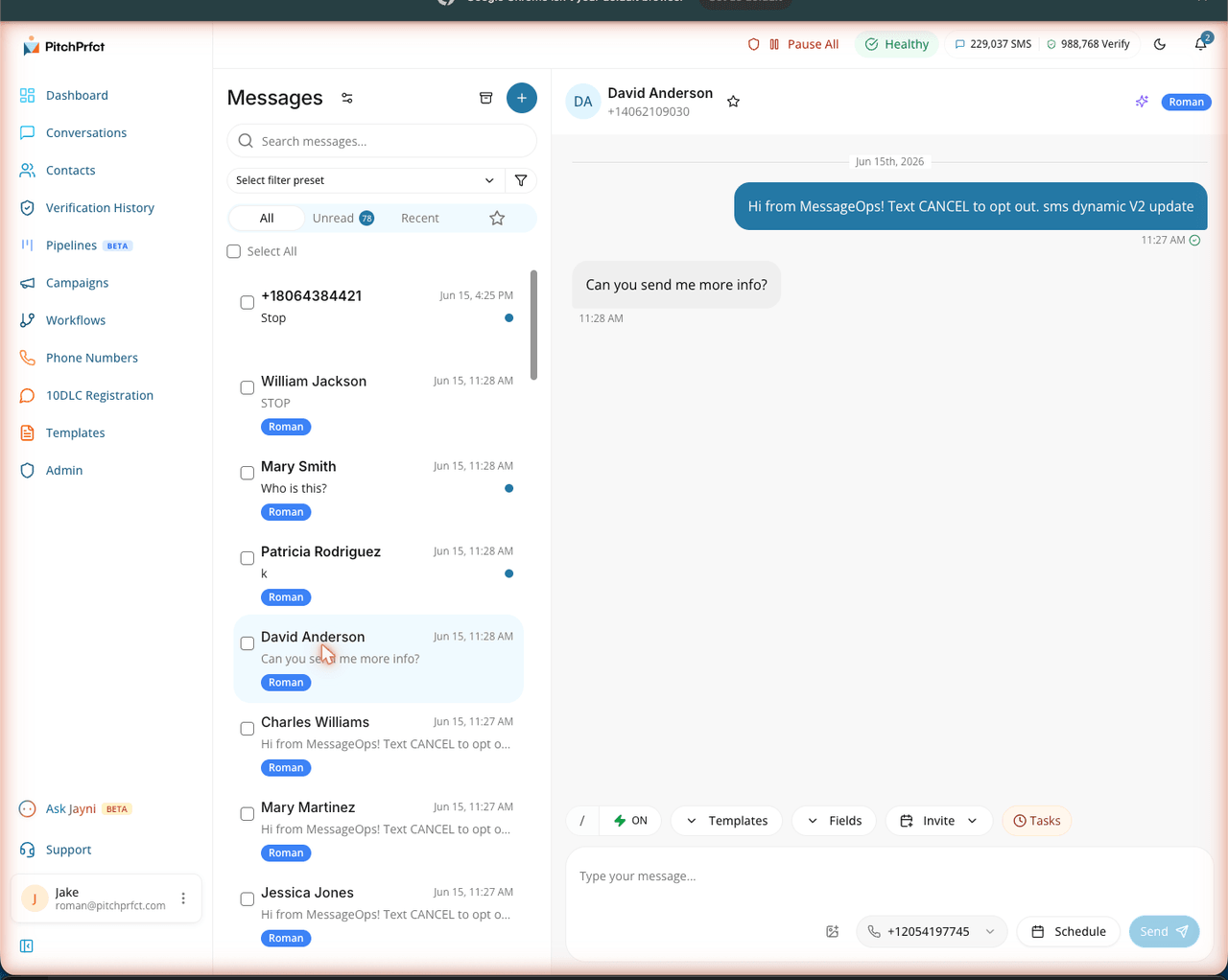
{firstName}, then send a one-off text or a campaign to a whole list — with scheduling so it goes out at the right time. - Work the replies. Every response lands in the conversations inbox, where you (or anyone on your team) can pick it up, tag it, and follow up.
The replies are where a business platform really pulls away from a mirrored phone. A blast or campaign starts the conversation; the conversations inbox is where a human takes it from interest to a sale, with the whole timeline in one place.
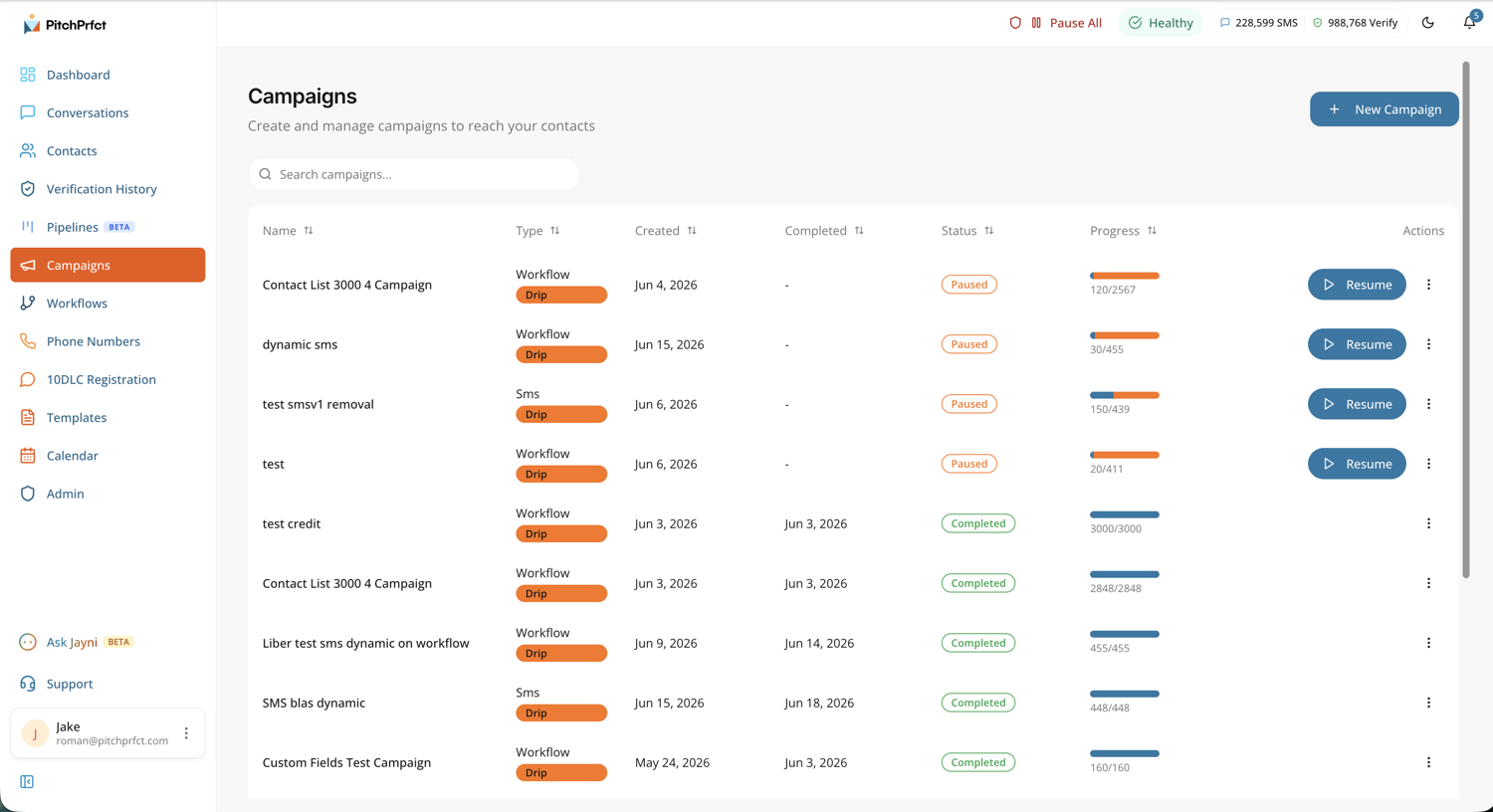
You can also set up drip workflows so follow-up sends itself: a tag triggers a sequence, a wait step paces it, and replies cancel the rest. That's the kind of automation a mirrored phone can't touch.
PitchPrfct is $99/month + $0.007 per SMS segment, all-in — carrier passthrough fees are already included in the per-message rate. ($1/mo per number and the standard $10/mo TCR campaign fee apply on top; an MMS is 3 credits, ~$0.021.) There's a 14-day free trial and no setup fee. It's SMS-focused, so there's no email channel — texting customers from a computer is exactly what it's built for.
Which should you use?
- Texting a friend from your laptop? Use the free personal tools — iMessage, Google Messages for web, or Phone Link. They mirror your phone and cost nothing.
- Texting customers, a team, or any real volume? Use a browser-based business SMS platform. You get a business number, a shared inbox, lists, and compliance the personal tools don't have.
If you're not sure which SMS tool to pick, compare your options in our roundup of the best mass texting apps, and for the bigger picture on the channel, start with what SMS marketing is.
Related reading
- How to send an SMS blast — send one message to a whole list the right way.
- SMS campaigns — plan, send, and measure a campaign from the browser.
- The best mass texting apps — compare platforms for business texting.
- What is SMS marketing? — the channel, start to finish.
Frequently asked questions
How do I text from my computer for free?
Can I text from my computer without a phone?
How do businesses text from a computer?
How do I text from my computer for business without using my personal number?
Can I send the same text to a lot of people from my computer?
Is texting from a computer secure for business?
Ready to text customers from your computer — with a real business number and a shared inbox? Start a free trial.