
You can send a text from email in two ways. The old way: address an email to a phone number at a carrier gateway, like 5551234567@vtext.com. The reliable way for any business: an SMS platform that triggers texts from your email or app through a real API. One problem with the old way — most US carriers have already turned it off. Here's how both work, and when to use which.
How the carrier email-to-SMS gateway works
Every US carrier used to run a free email to SMS gateway. The idea was simple. Each phone number had a matching email address. Send a plain email to that address and the carrier converted it into a text message on the recipient's phone.
The address format is the 10-digit phone number, then @, then the carrier's gateway domain:
5551234567@vtext.com→ a text to a Verizon number5551234567@txt.att.net→ a text to an AT&T number5551234567@tmomail.net→ a text to a T-Mobile number
The subject line and body became the message. For a picture, you used the carrier's MMS domain instead (Verizon's @vzwpix.com, for example) and attached the image.
Common US carrier gateway domains
Here's the reference table people search for. Note the status column — it matters more than the address now.
| Carrier | SMS gateway | MMS gateway | Status (2026) |
|---|---|---|---|
| Verizon | number@vtext.com |
number@vzwpix.com |
Phasing out, ends Mar 31, 2027 |
| AT&T | number@txt.att.net |
number@mms.att.net |
Shut down June 17, 2025 |
| T-Mobile | number@tmomail.net |
number@tmomail.net |
Discontinued Dec 2024 |
| Sprint | number@messaging.sprintpcs.com |
number@pm.sprint.com |
Defunct (merged into T-Mobile) |
| Google Fi | number@msg.fi.google.com |
number@msg.fi.google.com |
Active |
Dates verified June 2026 against carrier shutdown reporting from PagerTree and Textmagic. Carriers retired these gateways because they turned into spam and phishing channels that nobody wanted to police under modern A2P rules.
The honest limitations
Free is the only thing the gateway has going for it. Everything else is a problem:
- It's disappearing. AT&T and T-Mobile are already off. Verizon has a 2027 deadline and runs intermittently in the meantime. Sprint is gone. You're sending into a service that may not exist next quarter.
- No delivery confirmation. The email leaves your outbox and vanishes. You never learn whether the text arrived, bounced, or got dropped. There's no receipt and no error.
- Spam filtering. Carriers treat gateway traffic as the highest-risk mail they handle. A clean message can land in spam or get silently filtered with no notice to you.
- Rate limits. Send more than a trickle and the carrier throttles or blocks you. The gateway was built for a person pinging one friend, not a business reaching a list.
- You have to know the carrier. The domain depends on the recipient's carrier. People port numbers between carriers constantly, so your address is a guess.
- No compliance. No opt-out handling, no quiet hours, no 10DLC registration. None of the TCPA machinery a business needs.
For one quick text to your own phone, it's fine. For anything a business does — reminders, alerts, follow-ups, campaigns — it falls apart fast.
The business way: send texts from email through an SMS platform
If you want to send a text from email and have it actually arrive, the answer is an SMS platform with an API. You keep working in your email or your app; the platform handles the carrier side with a real business number, 10DLC registration, and a delivery status on every message.
This is where PitchPrfct fits. It's an SMS platform with a REST API and outbound webhooks, plus no-code Zapier and Make.com connectors. So a new row in your CRM, a form submission, or an email event can trigger a text without you copying a number into an address bar.
Two ways to wire it up:
- No-code (Zapier or Make.com). Pick a trigger — a new lead, a paid invoice, an incoming email parsed by Zapier — and map it to a "send SMS" action. No engineers. This is the closest replacement for the old "email a number" habit, and it's far more reliable.
- Developer (REST API). Call the endpoint from your own code to send messages, manage contacts, and read replies. Listen on webhooks for delivery status and inbound texts in real time.
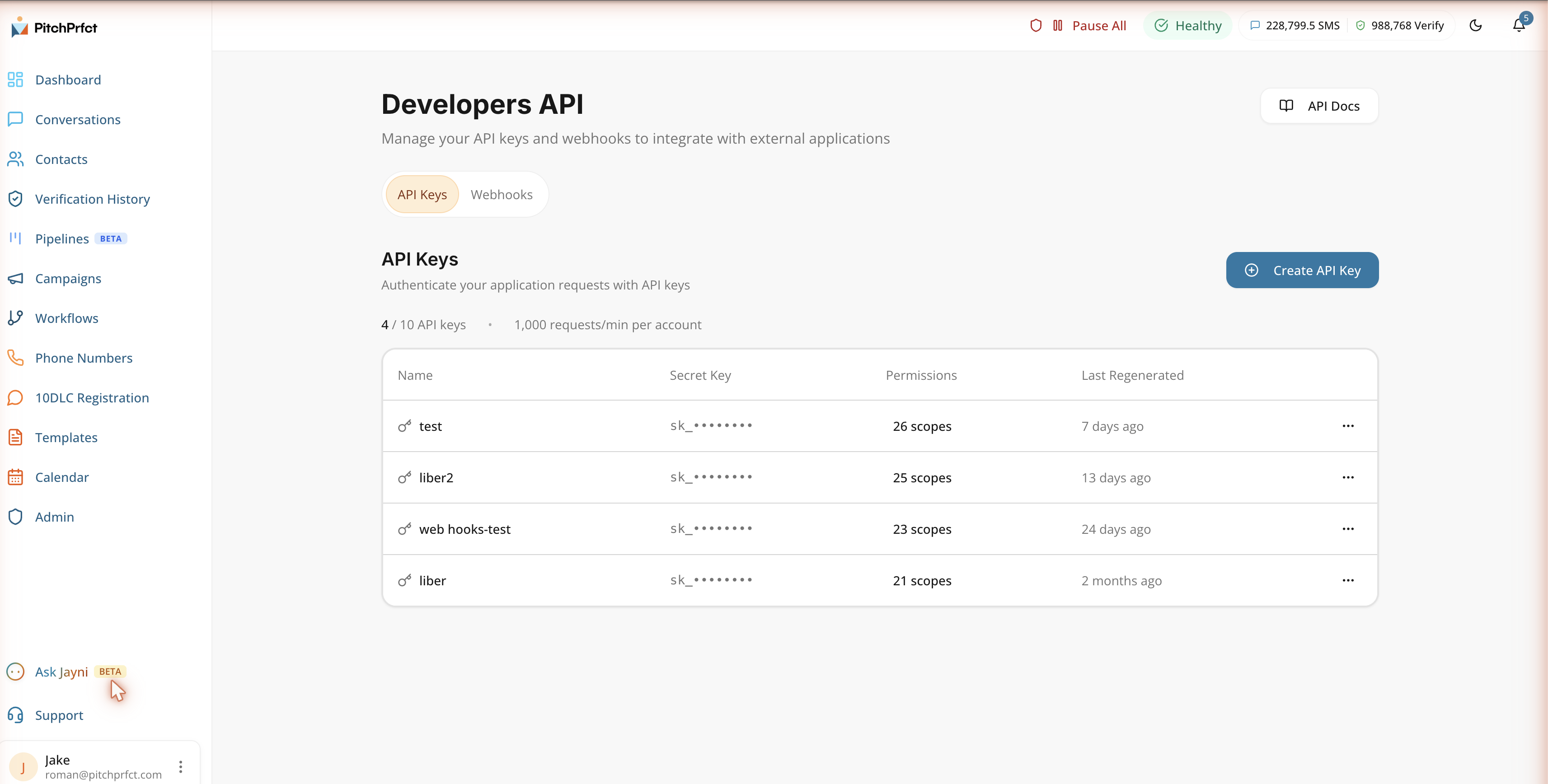
For the full breakdown of every connection path, see our guide to the SMS API and integrations.
Carrier gateway vs SMS API: side by side
| Carrier email-to-SMS gateway | SMS platform / API (PitchPrfct) | |
|---|---|---|
| Cost | Free (where it still works) | $99/mo + $0.007/segment, all-in |
| Reliability | Heavy spam filtering, frequent drops | Built for business sending volume |
| Delivery confirmation | None | Per-message delivery status |
| Rate limits | Tight, throttled fast | Built for real send volume |
| Carrier coverage | Must know recipient's carrier | Any US number, carrier handled for you |
| Compliance | None | 10DLC, opt-out handling, quiet hours |
| Two-way replies | No | Yes, full conversations inbox |
| Still available | Mostly shut down | Yes |
Compliance stays simple because the platform handles it. PitchPrfct guides your 10DLC registration and runs the TCPA basics — opt-out handling and quiet hours — so the part that sinks gateway sending mostly runs itself. (For the letter of the rules, the FCC is the authority. This isn't legal advice.)
What it costs
PitchPrfct runs $99/month plus $0.007 per SMS segment, all-in — carrier passthrough fees are already baked into that per-message rate. A number is $1/mo, the standard $10/mo TCR campaign fee applies on top, and an MMS counts as 3 credits (about $0.021). There's a 14-day free trial and no setup fee. It's SMS-only — no email channel — and it does texting properly.
If you'd rather skip email entirely and just text from a screen, our guide to sending texts from your computer covers the browser workflow.
Which should you use?
- A one-off text to your own phone, and your carrier still runs a gateway? The free gateway is fine. Email the number, send, done.
- Anything a business does — reminders, alerts, follow-ups, campaigns, or sends that need to arrive? Use an SMS platform. You get delivery confirmation, real send volume, two-way replies, and compliance, none of which the gateway offers. Trigger it from email through SMS workflow automation with Zapier or the API.
Frequently asked questions
Can I send a text from email for free?
number@carrier-domain (like @vtext.com) and it lands as a text. But most US carriers have shut their gateways down: AT&T in June 2025, T-Mobile in December 2024, and Verizon is phasing out by March 2027. Free gateways also have no delivery confirmation and heavy spam filtering, so they aren't dependable for anything that matters.What is an SMS gateway?
Do carrier email-to-text gateways still work?
What's the carrier email-to-SMS gateway address format?
5551234567@vtext.com for Verizon or 5551234567@txt.att.net for AT&T. For picture messages you use the carrier's MMS domain instead. One snag: you have to know the recipient's carrier, and number porting makes that a guess.How do I send texts from email for a business?
Related reading
Wiring texting into your stack? Start with the SMS API and integrations guide, then see how to text from your computer and how to set up SMS workflow automation. New to the channel? Our what is SMS marketing pillar covers the fundamentals.
Want texts that actually arrive, triggered from the tools you already run? Start a free trial.